RESPONSIBLE AI

AI should strengthen judgment, not replace accountability.

Adaptive Resilience Intelligence uses AI to help make complex technology and cybersecurity information easier to understand and work with.

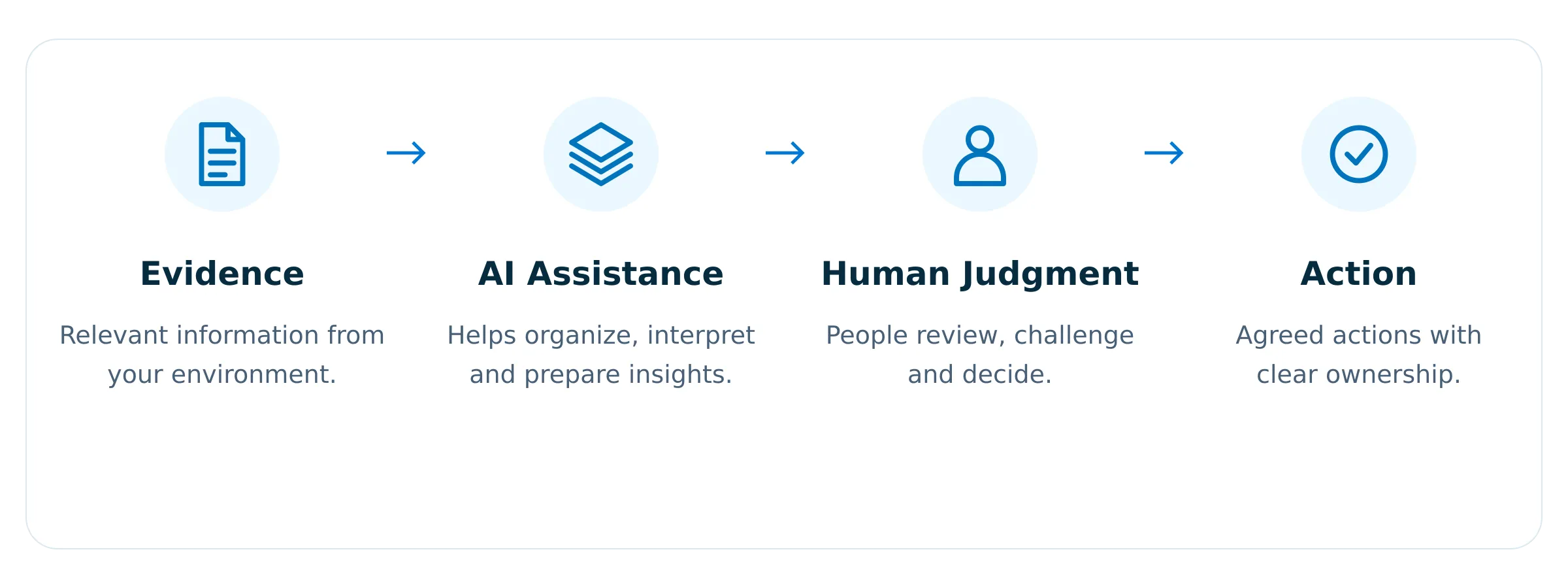
But useful AI needs clear boundaries. We design ARI so AI can assist with understanding, preparation and communication while important decisions remain accountable to people.

Diagram showing a responsible AI workflow with four steps: Evidence, AI Assistance, Human Judgment, and Action, each with a relevant icon and descriptive text explaining the process from gathering information to agreed actions.
USE AI WHERE IT HELPS

Keep people responsible where it matters.

ARI is not designed around the idea that more autonomy is always better. The role of AI should match the task.

Blue document icon with a folded top-right corner and three horizontal lines representing text.
Assist
Help organize and interpret relevant information.
Three stacked blue layers resembling sheets or documents, with rounded corners, viewed at an angle.
Prepare
Support summaries, explanations and working material.
Blue gear or cogwheel icon with eight teeth and a circular hole in the center.
Support
Help people move through defined product experiences.
Blue icon of two user profiles side by side, representing multiple users or a group.
Escalate
Leave material decisions and higher-impact actions with authorized people.
Blue information icon with a lowercase letter 'i' inside a circle.

AI can make work easier. It should not make accountability disappear.

PRACTICAL AI

The value is in the outcome, not how much AI is used.

Within ARI, AI may help users:

Blue magnifying glass icon symbolizing search or zoom.
Understand
Make complex information easier to review.
Blue ascending bar chart with three vertical bars increasing in height from left to right and a line graph with an arrow pointing upward representing growth or progress.
Prepare
Organize relevant information into useful summaries and working material.
Blue ascending bar chart with three vertical bars increasing in height from left to right and a line graph with an arrow pointing upward representing growth or progress.
Support
Help users focus attention and prepare improvement activity.
Blue speech bubble icon with three horizontal dots inside, representing a message or chat.
Communicate
Translate technical information into clearer language for different audiences.
Blue information icon with a lowercase letter 'i' inside a circle.

The available AI capabilities will depend on the product stage and the specific product experience.

PRACTICAL AI

The value is in the outcome, not how much AI is used.

Within ARI, AI may help users:

Blue shield outline with a checkmark inside representing security or protection.
Business & Risk Decisions
Material organizational decisions, including risk acceptance, remain with authorized people.
Blue icon of two user profiles side by side, representing multiple users or a group.
Access & Authority
AI does not grant itself or others new permissions.
Blue lightning bolt icon with a thick outline and sharp angles.
High-Impact Actions
Actions that could materially affect a customer environment remain subject to appropriate human involvement.
UNDERSTAND THE BASIS FOR AN OUTPUT

A confident answer is not the same as a reliable answer.

AI can produce language that sounds certain even when the underlying information is incomplete. ARI is designed so important outputs remain connected to relevant supporting information.

Blue document icon with a folded top-right corner and three horizontal lines representing text.
Evidence-Connected
Inspect information supporting an output.
Blue broken chain link symbol representing disconnection or break in link.
Source-Aware
Relevant source information remains visible.
Blue clock icon with a circular arrow wrapping around the top-left side, indicating time or history.
Current Where It Matters
See when supporting information was last updated.
Blue icon of two user profiles side by side, representing multiple users or a group.
Human Review
Important conclusions remain open to review.
Priority
Identity & Access Review
Why this deserves attention
Multiple indicators suggest there may be opportunities to strengthen identity and access practices.
Supporting information
Blue shield outline with a checkmark inside representing security or protection.
Microsoft identity source
Last updated 2 days ago
Blue shield outline with a checkmark inside representing security or protection.
Microsoft security source
Last updated 4 days ago
Blue document icon with a folded top-right corner and three horizontal lines representing text.
Internal assessment
Last updated 12 days ago
TRANSPARENCY MATTERS

AI assistance is not automatic truth.

AI systems can misunderstand context, produce incomplete answers or make incorrect assumptions. We design ARI to make uncertainty easier to recognize rather than manufacture certainty.

Blue information icon with a lowercase letter 'i' inside a circle.

AI Assistance ≠ Automatic Truth

RESPONSIBLE AI IS NOT A FINAL CHECKLIST

It starts before a capability reaches a customer.

Blue information icon with a lowercase letter 'i' inside a circle.

The level of review should reflect the potential impact of the capability.

AI DOES NOT CHANGE THE DATA RULES

Adding AI should not weaken expectations around customer information.

The same principles that guide ARI’s broader data and security approach continue to apply when AI is involved.

Blue padlock icon symbolizing security or locked access.
Purpose-Limited
Use information only for the intended task.
Blue icon of two user profiles side by side, representing multiple users or a group.
Customer-Bounded
Keep customer information associated with the appropriate organization.
Blue shield outline with a checkmark inside representing security or protection.
Appropriate Access
AI does not expand what a user or capability is authorized to access.

External AI and cloud providers remain part of the product’s security and data-handling considerations.

THE SHORT VERSION

Five principles guide how we think about AI.

Blue target icon with an arrow hitting the center circle.
Purpose
Use AI where it creates meaningful value.
Blue document icon with a folded top-right corner and three horizontal lines representing text.
Evidence
Keep important outputs connected to supporting information.
Blue shield outline with a checkmark inside representing security or protection.
Boundaries
Do not let AI determine its own authority.
Simple blue eye icon with a circular pupil in the center and an almond-shaped outline.
Transparency
Be clear about limitations and uncertainty.
Blue icon of two user profiles side by side, representing multiple users or a group.
Accountability
Keep people responsible for material decisions.

Useful intelligence. Clear boundaries. Accountable decisions.

ARI is being designed to help organizations make better use of AI without asking them to surrender judgment, control or responsibility.

White check mark inside a white circle.
AI can assist the decision.
White check mark inside a white circle.
Accountability remains human.
White check mark inside a white circle.
Designed for real-world organizations.
White check mark inside a white circle.
Aligned with privacy and security principles.