MANAGED RESILIENCE INTELLIGENCE

Keep resilience moving between major reviews.

Adaptive Resilience Intelligence gives you the insight. Our experts help you maintain focus, move priorities forward and keep progress visible.

Blue ascending bar chart with three vertical bars increasing in height from left to right and a line graph with an arrow pointing upward representing growth or progress.
Software intelligence
Blue icon of two user profiles side by side, representing multiple users or a group.
Practical guidance
Blue refresh or reload icon composed of two curved arrows forming a circle, one arrow pointing left and upward, the other right and downward.
Ongoing improvement
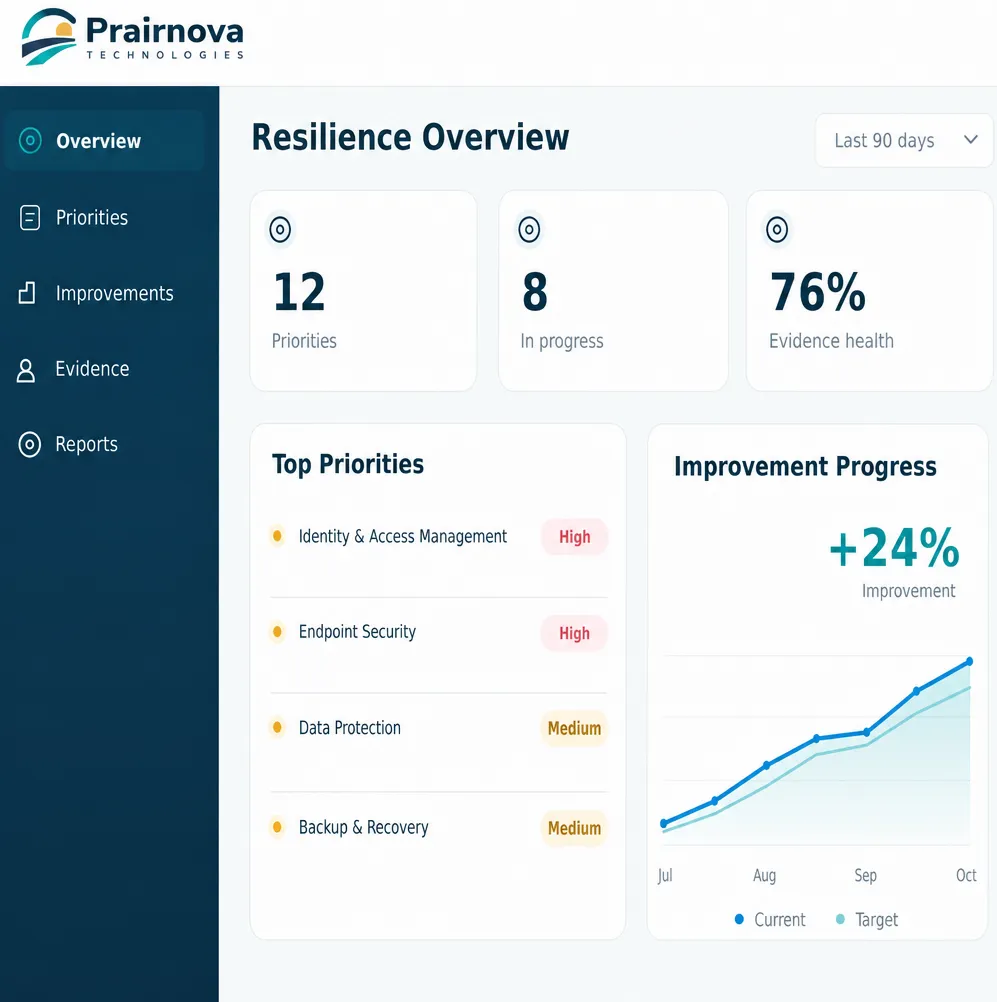
Dashboard from Prairnova Technologies showing resilience overview with 12 priorities, 8 in progress, and 76% evidence health over the last 90 days. Top priorities listed as Identity & Access Management and Endpoint Security labeled High, Data Protection and Backup & Recovery labeled Medium. A line graph on improvement progress shows a 24% improvement from July to October, tracking current versus target.
THE PLATFORM PROVIDES CONTINUITY. EXPERT SUPPORT HELPS MAINTAIN MOMENTUM.

Good priorities still need ownership and follow-through.

Adaptive Resilience Intelligence helps you see what matters. Managed Resilience Intelligence adds a recurring layer of practical support to keep priorities current and turn them into real progress.

Blue icon of a computer monitor displaying an upward trending line chart next to a smartphone, symbolizing digital analytics or data monitoring on multiple devices.
Adaptive Resilience Intelligence
(The Platform)
Blue check mark inside a blue circle.
Resilience overview
Blue check mark inside a blue circle.
Priorities and evidence
Blue check mark inside a blue circle.
Improvement tracking
Blue check mark inside a blue circle.
Outcome history
Blue check mark inside a blue circle.
Executive visibility
Blue icon of two user profiles side by side, representing multiple users or a group.
Managed Resilience Intelligence
(Expert Support)
Blue check mark inside a blue circle.
Recurring review
Blue check mark inside a blue circle.
Practical guidance
Blue check mark inside a blue circle.
Improvement support
Blue check mark inside a blue circle.
Outcome discussion
A PRACTICAL OPERATING LAYER

Focus on the work that keeps resilience improving.

Blue database icon showing a stack of cylindrical disks representing data storage.
Evidence Health
Review whether the information supporting the current resilience view remains available and current.
Blue target icon with an arrow hitting the center circle.
Priority Review
Maintain a clearer view of what deserves attention now.
Three blue check marks each followed by a horizontal blue line, representing a checklist or completed tasks.
Improvement Planning
Help translate agreed priorities into practical actions with visible ownership.
Blue ascending bar chart with three vertical bars increasing in height from left to right and a line graph with an arrow pointing upward representing growth or progress.
Outcome Review
Review whether current evidence supports meaningful progress.
Blue shield outline with a checkmark inside representing security or protection.

Prairnova supports the process. The customer retains decision authority and ownership of its environment.

A regular rhythm. Not another stream of alerts.

The goal is not more meetings. It is a more consistent way to keep important work moving.

Blue magnifying glass icon symbolizing search or zoom.
01
Review
Look at what has changed and whether the current view remains useful.
Blue target icon with an arrow hitting the center circle.
Focus
Agree on the priorities that deserve attention.
02
Blue gear or cogwheel icon with eight teeth and a circular hole in the center.
Improve
Keep ownership and progress visible.
03
Blue ascending bar chart with three vertical bars increasing in height from left to right and a line graph with an arrow pointing upward representing growth or progress.
Verify
Review whether meaningful progress can be supported by current evidence.
04
A CLEARER OPERATING PICTURE

Help leaders see progress while giving lean teams more leverage.

Blue icon of two user profiles side by side, representing multiple users or a group.
FOR LEADERS
Blue target icon with an arrow hitting the center circle.
Know what needs attention
See the areas currently requiring focus.
Blue ascending bar chart with three vertical bars increasing in height from left to right and a line graph with an arrow pointing upward representing growth or progress.
See what is moving
Understand which improvements are underway and who owns them.
Blue document icon with a folded top-right corner and three horizontal lines representing text.
See where progress is evident
Review where current information supports meaningful improvement.
Blue user icon with a circular head and rounded shoulders.
FOR TECHNOLOGY & SECURITY TEAMS
Blue gear or cogwheel icon with eight teeth and a circular hole in the center.
Maintain focus
Keep agreed priorities visible despite competing operational work.
Blue icon of two user profiles side by side, representing multiple users or a group.
Add structure
Turn important improvement work into clearer ownership and progress.
Blue icon of two user profiles side by side, representing multiple users or a group.
Prepare better conversations
Spend less time assembling status information and more time deciding what to do next.
YOUR ORGANIZATION REMAINS IN CONTROL

Better support does not mean giving away responsibility.

We can help organize information, support improvement planning and maintain a useful operating rhythm. Your organization remains responsible for:

Icon of a classical building with four pillars and a triangular pediment.
Business decisions
Determining what matters to your organization.
Blue shield outline with a checkmark inside representing security or protection.
Risk decisions
Deciding which risks are treated, accepted or deferred.
Blue document icon with a folded top-right corner and three horizontal lines representing text.
Internal approval
Authorizing changes, investments and decisions.
Three blue check marks each followed by a horizontal blue line, representing a checklist or completed tasks.
Implementation ownership
Completing agreed actions.
CLEAR BOUNDARIES

Managed resilience is not outsourced IT.

Managed Resilience Intelligence is not intended to be:

Blue close or cancel icon in the shape of an X with rounded ends.
A 24x7 security operations centre
Blue close or cancel icon in the shape of an X with rounded ends.
An outsourced IT department
Blue close or cancel icon in the shape of an X with rounded ends.
Unlimited consulting
Blue shield outline with a checkmark inside representing security or protection.

Where implementation or specialist services are needed, those can be scoped separately.

CHOOSE THE SUPPORT THAT FITS

Choose the level of support that fits your organization.

Blue icon of a computer monitor displaying an upward trending line chart next to a smartphone, symbolizing digital analytics or data monitoring on multiple devices.
Platform
For organizations that want to operate ARI primarily with their own team.
Blue gear or cogwheel icon with eight teeth and a circular hole in the center.
Additional Improvement Services
Where needed, separate scoped work can support specific cybersecurity, Microsoft Cloud, AI or technology improvements.

Keep the improvement cycle moving.

If your organization wants the benefits of ARI with recurring expert support, we can help determine the right approach for your team.

White check mark inside a white circle.
Software intelligence
White check mark inside a white circle.
Practical expertise
White check mark inside a white circle.
Ongoing improvement
White check mark inside a white circle.
A stronger, more resilient organization