INTEGRATIONS

Start with the technology you already use.

Organizations already generate valuable technology and cybersecurity information across identity, endpoint, security and productivity platforms.

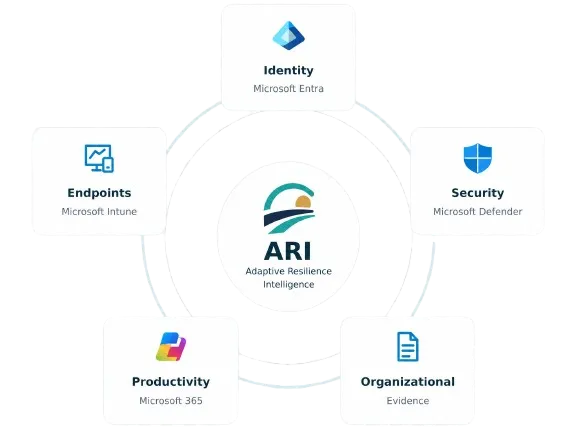
Adaptive Resilience Intelligence is being designed to help bring that information into a clearer resilience improvement experience.

Microsoft logo consisting of four colored squares arranged in a 2x2 grid: red top-left, green top-right, blue bottom-left, and yellow bottom-right.
Microsoft-first.
Blue database icon showing a stack of cylindrical disks representing data storage.
Evidence-driven.
Blue ascending bar chart with three vertical bars increasing in height from left to right and a line graph with an arrow pointing upward representing growth or progress.
Designed to evolve
Diagram showing ARI Adaptive Resilience Intelligence logo at center connected by circular lines to five surrounding boxes labeled Identity (Microsoft Entra), Security (Microsoft Defender), Organizational (Evidence), Productivity (Microsoft 365), and Endpoints (Microsoft Intune), each with corresponding icons.
NO RIP-AND-REPLACE REQUIRED

Better resilience shouldn’t require another technology replacement program.

Organizations have already invested in platforms that manage identity, devices, security and day-to-day operations. ARI is not intended to replace those systems. It is designed to help organizations make better use of the evidence those systems already provide.

Blue database icon showing a stack of cylindrical disks representing data storage.
Existing Technology
Continue using the platforms that perform the operational work.
Abstract logo featuring a golden semicircle representing a sun partially behind dark and teal curved lines resembling hills or waves.
Adaptive Resilience Intelligence
Bring relevant evidence into a broader organizational view.
Blue ascending bar chart with three vertical bars increasing in height from left to right and a line graph with an arrow pointing upward representing growth or progress.
Better Decisions
Support clearer priorities, ownership and measurable improvement.
INITIAL INTEGRATION ROADMAP

Microsoft-first. Not Microsoft-limited.

Many of the organizations we’re building ARI for already operate heavily within Microsoft. That makes Microsoft a practical starting point for the platform’s evidence connections.

Microsoft is the starting ecosystem because it is already deeply embedded in many of the organizations ARI is intended to serve. It is not intended to become the boundary of the platform.

Abstract geometric logo with overlapping diamond shapes in shades of blue, forming a hollow central diamond.
Microsoft Entra
Identity & Access
Potential evidence may support understanding of identity posture, access and administrative practices.
Initial Integration Roadmap
Icon showing a blue computer monitor next to a smartphone with an arrow pointing from the monitor to the smartphone, symbolizing device connection or transfer.
Microsoft Intune
Endpoint Management
Potential evidence may support understanding of device management and endpoint configuration.
Initial Integration Roadmap
Shield emblem divided into four quadrants with alternating light and dark blue shades, representing Microsoft Defender.
Microsoft Defender
Security & Exposure
Potential evidence may support understanding of security recommendations and relevant exposure information.
Initial Integration Roadmap
Multicolored abstract logo with overlapping rounded rectangles in blue, purple, red, yellow, and green gradients forming a dynamic shape.
Microsoft 365
Productivity & Collaboration
Potential evidence may support understanding of selected technology and configuration context where appropriate.
Initial Integration Roadmap
Blue ascending bar chart with three vertical bars increasing in height from left to right and a line graph with an arrow pointing upward representing growth or progress.
Microsoft Security Posture
Recommendations & Posture
Relevant Microsoft security posture information may provide useful evidence for areas requiring attention.
Initial Integration Roadmap
EVIDENCE WITHOUT THE INTEGRATION NOISE

See what matters without managing another integration console.

The customer experience focuses on useful information, not connector plumbing.

Prairnova Technologies dashboard showing Evidence section with filters for sources, types, and date range. The table lists four evidence entries: Microsoft Entra with privileged access review recommended related to Identity & Access, Microsoft Defender with security recommendation present related to Endpoint Security, Microsoft Intune with device configuration review needed related to Device Management, and Internal Assessment with recovery exercise review needed related to Backup & Recovery. Dates of last updates range from 1 to 12 days ago.
YOUR ENVIRONMENT. YOUR ACCESS.

Connections should be intentional.

Prairnova is designing integrations around explicit customer authorization and appropriate access.

Blue user icon with a circular head and rounded shoulders.
Customer-Authorized
Connections are established for the customer’s intended use.
Blue shield outline with a checkmark inside representing security or protection.
Least Privilege
Access is limited to what is required for the product capability.
Blue document icon with a folded top-right corner and three horizontal lines representing text.
Reviewable
Customers should be able to understand which source systems are connected to ARI.

Microsoft is the starting ecosystem because it is already deeply embedded in many of the organizations ARI is intended to serve. It is not intended to become the boundary of the platform.

Blue shield outline with a checkmark inside representing security or protection.
Security Platforms
Relevant security information from approved systems.
Blue gear or cogwheel icon with eight teeth and a circular hole in the center.
IT Operations
Information that helps explain operational technology context.
Blue icon of two user profiles side by side, representing multiple users or a group.
Organizational Evidence
Assessments and other approved organizational information.
Additional evidence sources will be prioritized based on customer need and product validation.
BEYOND ONE ECOSYSTEM

Microsoft is the starting point, not the boundary.

Resilience evidence can come from more than one technology environment. Over time, ARI is intended to support broader evidence categories where they create meaningful customer value.

Blue globe icon with horizontal and vertical lines representing latitude and longitude.
Vendor-Independent
The resilience experience is designed above any single technology ecosystem.
Blue target icon with an arrow hitting the center circle.
Outcome-Focused
Connections matter only when they help create better understanding, action or improvement.
DESIGNED FOR FLEXIBILITY

Your resilience intelligence shouldn’t depend on one technology vendor.

ARI is being designed as an intelligence and improvement layer above the systems organizations already rely on. The value should come from better decisions and measurable improvement, not from the number of connectors available.

Start with the environment you already have.

We’re working with selected organizations to validate which evidence connections create the most useful resilience outcomes. Design partners can help us understand where existing information adds value and where integration creates unnecessary complexity.

White check mark inside a white circle.
Build on your existing technology
White check mark inside a white circle.
Validate real-world value
White check mark inside a white circle.
Help shape future integrations